Your UI looks right. The layout is clean, the colors are correct, everything renders perfectly.
But what is the browser — and the screen reader — actually seeing?
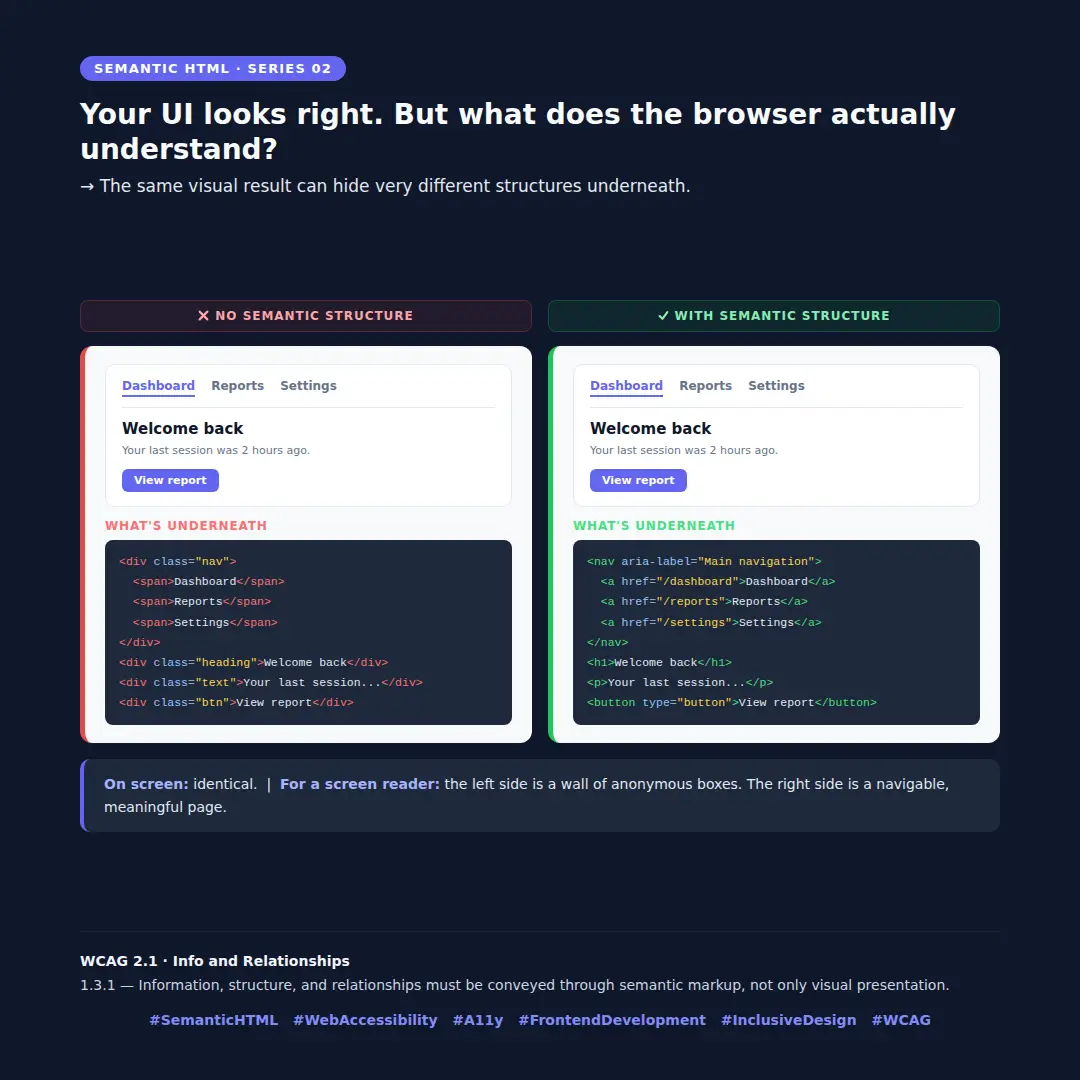
When we build components focused only on the visual result, the HTML underneath can be a wall of anonymous <div> and <span> elements. No headings. No landmarks. No interactive elements the browser can understand.
On screen, both versions look identical.
For a screen reader user, the left side is a wall of anonymous boxes with no structure to navigate. The right side is a page — with a navigation, a heading, a paragraph, and a button that actually behaves like a button.
Same visual. Completely different experience.
The structure you choose when building a component isn't just a technical detail — it's a decision that directly affects whether someone can use what you built.
What does the HTML underneath your components look like?
WCAG 2.1 · Info and Relationships
1.3.1 — Information, structure, and relationships must be conveyed through semantic markup, not only visual presentation.