Keyboard navigation testing goes beyond pressing Tab.
A systematic approach covers interaction patterns that automated tools like axe and Lighthouse will never catch — because they test structure, not behaviour.
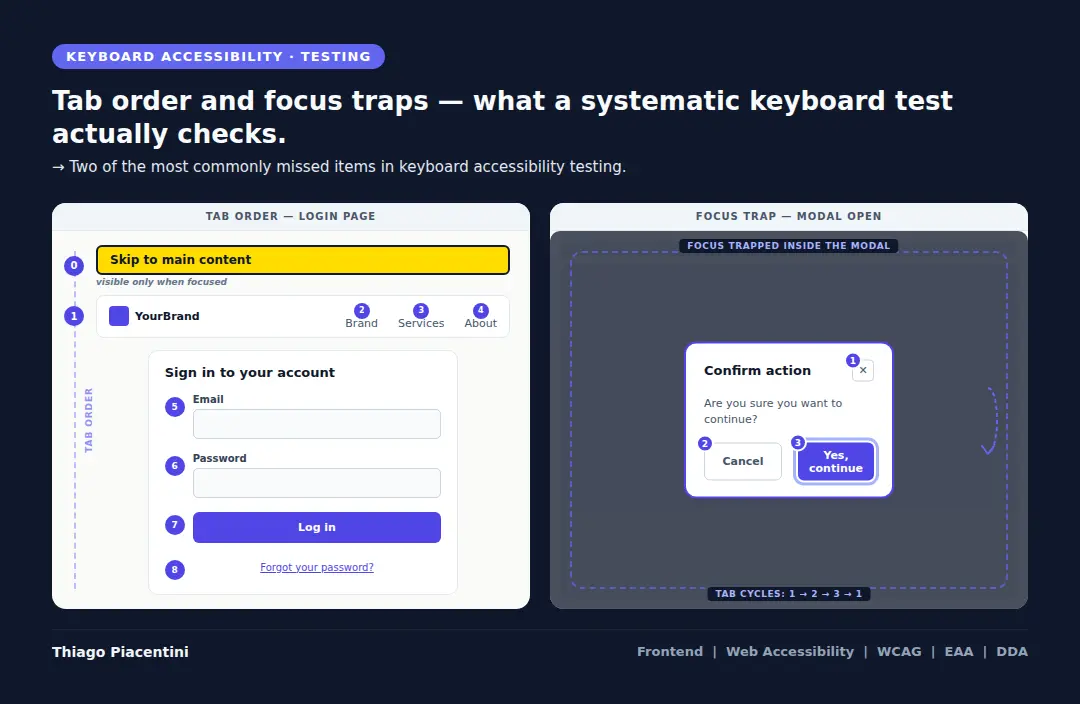
1. Start before the main content
The first Tab press should reach a skip link. If it doesn't exist, keyboard users are forced to tab through every nav item on every page load. This is a WCAG 2.4.1 failure — and one of the most common ones.
2. Tab through every interactive element
Buttons, links, inputs, selects, custom components. Every single one. If you can't reach it with Tab, it doesn't exist for keyboard users.
3. Check focus visibility at each stop
Not just "is there an outline" — but is it visible enough? WCAG 2.4.11 (Focus Appearance, introduced in WCAG 2.2) sets minimum requirements for focus indicator size and contrast. A 1px dotted outline on a white background doesn't pass.
4. Activate everything you reach
Enter on links and buttons. Space on checkboxes. Arrow keys on radio groups and select menus. If activation doesn't work, reaching the element with Tab stops making sense.
5. Test modals and overlays separately
Open the modal with the keyboard. Check that focus moves inside it. Try to Tab out — focus should stay trapped. Close it, and focus should return to the trigger that opened it. This is one of the most consistently broken patterns in modern interfaces.
6. Test in reverse
Shift+Tab back through everything. The order should make sense in both directions.
7. Don't use the mouse to reset
If you need to click something to continue testing, you found a bug. Document it and keep going without the mouse.
How long this takes will vary, depending on page complexity, data coming from APIs, and the flow being tested.
There's also something that rarely gets mentioned: when you're developing and testing at the same time, your eyes start seeing what they expect to see, not what's actually there. Familiarity with your own code creates real blind spots. That's exactly why the checklist exists — not as bureaucracy, but as protection against our own perception. Each item checked is a confirmation that something was verified, not just seen.
This will surface issues that axe, Lighthouse, and every automated tool will miss, because they test structure, not behaviour.
Semantic HTML is the foundation that makes all of this possible. But even perfect semantics can fail at the interaction layer. The keyboard test is where you find out.
What step do most teams skip? In my experience: the focus trap inside modals. Every time.