Testing with a screen reader requires a decision that is easy to overlook: which screen reader, and which browser.
They are not interchangeable. Each combination relies on a different accessibility API implementation, produces different output, and exposes different gaps in the same code. A component that works in one pairing can fail silently in another.
The WebAIM Screen Reader User Survey #10, conducted between December 2023 and January 2024 with 1,529 valid responses, is one of the most comprehensive sources of real-world data on how screen reader users interact with the web.
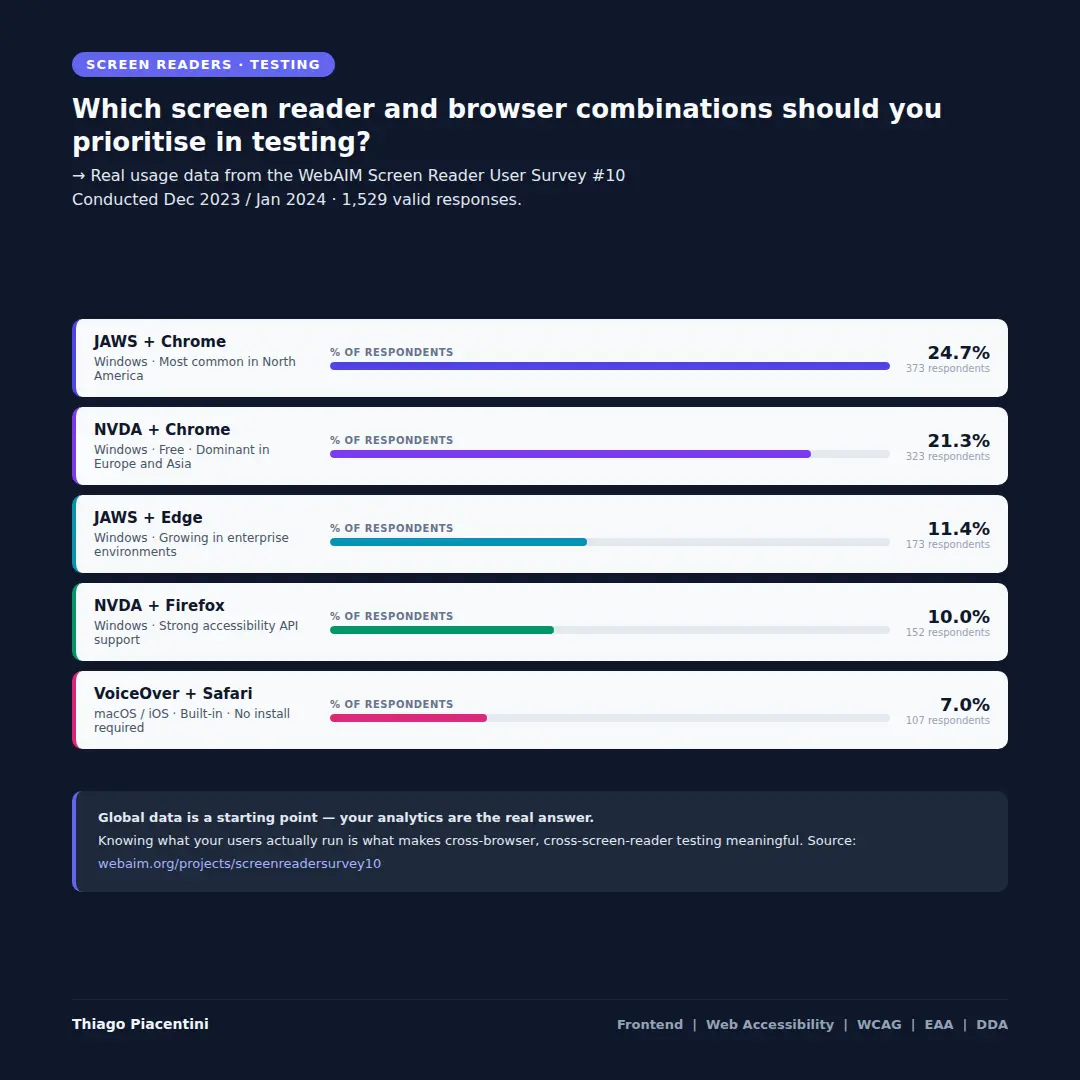
The five combinations that cover most of the real world
Based on the survey's screen reader and browser combination data, these are the pairings that represent the largest share of actual users:
-
JAWS + Chrome — 24.7% (373 respondents). The most common combination overall, and particularly dominant in North America where JAWS primary usage reaches 55.5%.
-
NVDA + Chrome — 21.3% (323 respondents). NVDA is free and open source, which drives its dominance in Europe, Asia, and Africa. In Europe, NVDA primary usage reaches 37.2%, surpassing JAWS at 29.7%.
-
JAWS + Edge — 11.4% (173 respondents). Microsoft Edge has grown significantly as a testing target, particularly in enterprise environments where JAWS is the default assistive technology.
-
NVDA + Firefox — 10.0% (152 respondents). Firefox has historically had strong accessibility API support, and this combination remains relevant for users who prefer open-source tools across the stack.
-
VoiceOver + Safari — 7.0% (107 respondents). The only native macOS and iOS combination. Because VoiceOver is built into Apple devices at no cost, it represents a distinct and important segment of users — particularly on mobile.
These five combinations together represent the majority of desktop screen reader usage reported in the survey.
Global data is a starting point, not an answer
The WebAIM survey provides a valuable baseline. But it carries an important caveat that the researchers themselves acknowledge: the sample is not controlled and may not represent all screen reader users.
The most accurate data about which combinations your users rely on is not a global survey. It is your own analytics.
Browser usage data, operating system distribution, and — where available — assistive technology signals from tools like Google Analytics or Plausible can tell you what your specific audience actually runs. A public government service in Germany has a very different user profile than a commercial SaaS product in North America. A single global dataset cannot reflect both accurately.
This is why analytics matters in accessibility decisions. Testing a combination that 25% of global survey respondents use is useful. Testing a combination that 60% of your actual users run is essential.
Cross-browser testing as an accessibility practice
Cross-browser testing is often framed as a visual consistency concern. In accessibility, it is something more fundamental.
When the same ARIA role is announced differently by two screen readers in two different browsers, users in each environment are experiencing a different product. One may receive complete and useful information. The other may receive partial output, incorrect output, or silence.
This is not a bug in the conventional sense — it is a consequence of how accessibility APIs, browser implementations, and screen reader interpretations interact. The only way to know the result is to test the combination.
The five pairings above are where to start. Your analytics are where to focus.
Reference: WebAIM Screen Reader User Survey #10 — December 2023 / January 2024